Power BI
This work sample demonstrates the ability to design and develop Power BI dashboard
Dataset and environments:
- AdventureWorks Data Warehouse 2017 (Publicly available dataset provided by Microsoft)
- Note: For this project, I added random sales target numbers (sales and volumes) in addition to the Microsoft dataset.
- Power BI desktop
- Background: “Adventure works” is a retailer focusing on outdoor bikes. They are selling products through two channels: 1) internet sales directly to end customers. 2) sales from resellers to end customers. This project’s dashboard focuses on 2) sales from “Adventure Works” to resellers in North America region.
Demonstrated skills:
- Design dashboard for the intended audience
- Extract, tranform and load data from data warehouse to Power BI desktop
- Edit query (add custom columns, add conditional columns, change datatype)
- Calculate values with DAX measures
- Dynamic color, words using conditional format with DAX
- Analytics Pane for constant line
Note: pbix file for this work sample will be provided upon request
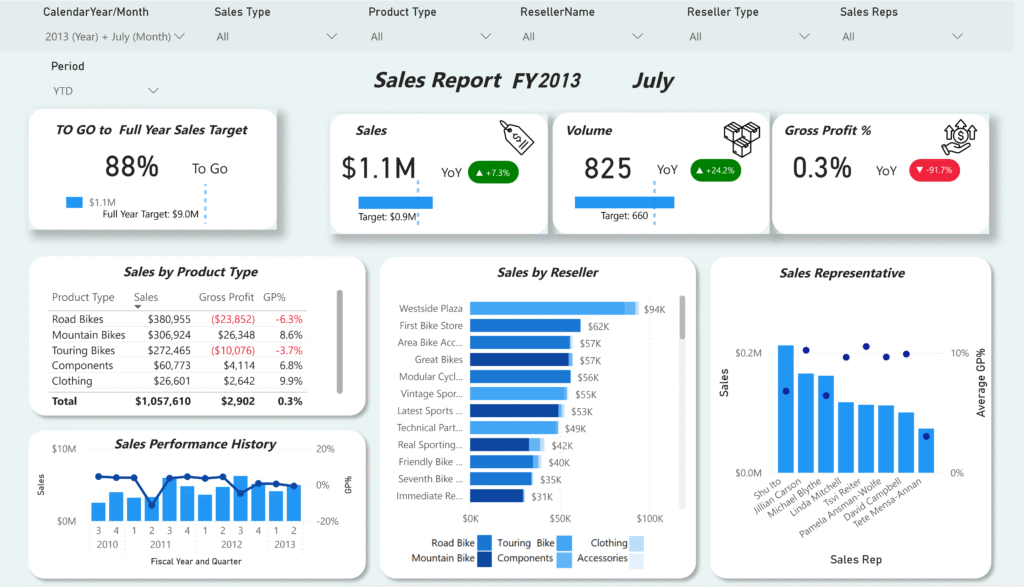
Work Sample: Sales Report Dashboard
- Audience: CRO, VP of sales, Sales manager, Sales representative
- Purpose
- For CRO, VP of sales: Intuitively grasp sales KPIs and spot gaps between actuals and targets. Quickly understand underlying metrics to affect performance.
- For Sales manager: Quickly see the performance of entire team and identify the areas more trainings/attentions needed
- For Sales representatives: Quickly see how they are performing and where they need to focus on